Eight Domains, 1,430 Organisations: Inside a Phone-and-Phish Operation Against Corporate Logins
Published 15 min read
Contents
In short
- Since July 2026 one operator has registered eight look-alike "key setup" domains and built a personal sign-in trap for about 1,430 organisations, mostly large US employers.
- Each target gets its own subdomain and its own page carrying its real Microsoft sign-in branding. A human operator approves every visitor, relays the password and the MFA response live, and finishes by pulling the employee into a Teams meeting with fake "IT".
- Being targeted is not being breached. A page built in an organisation's name shows intent, not a successful sign-in. This article lists what to check.
Why this isn't ordinary phishing
Most phishing is a numbers game: one fake page, a large mailing list, and whoever types a password.
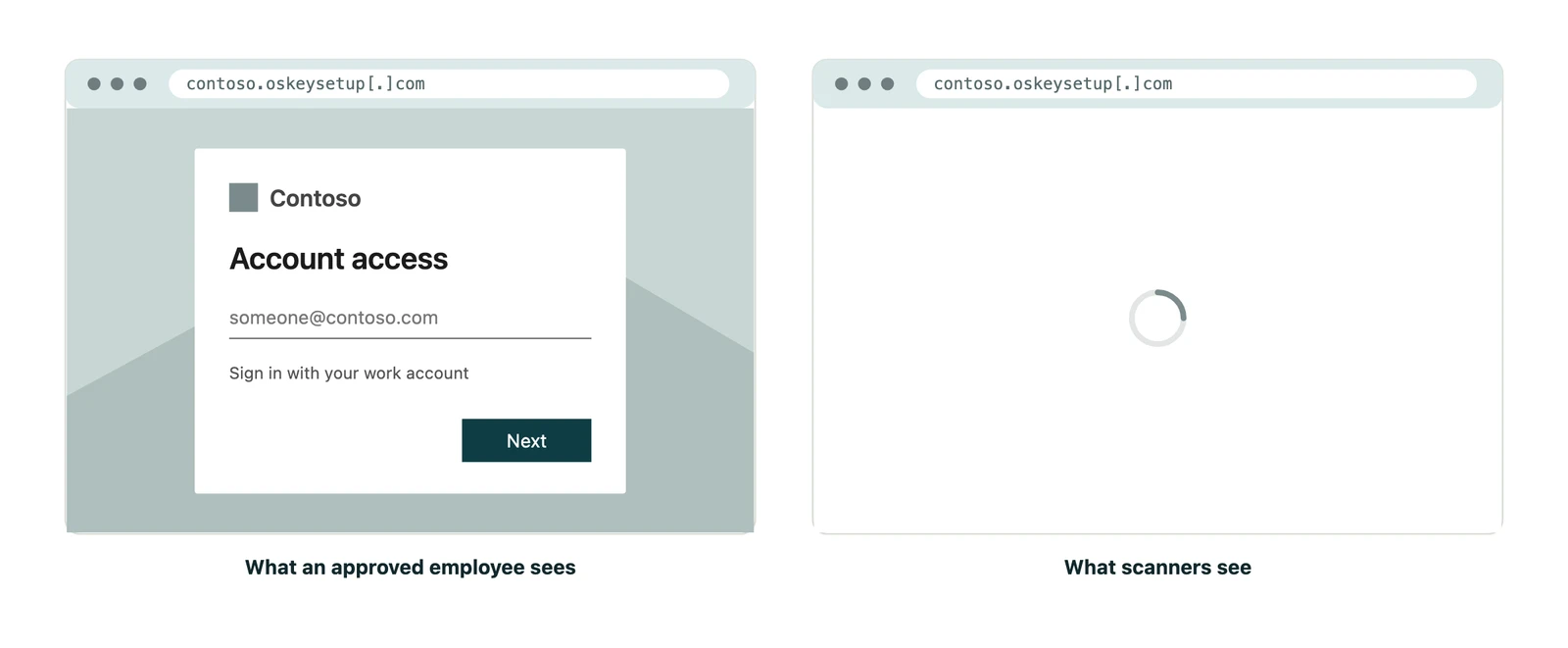
This operation works the other way round. The page is built for one organisation before anyone visits it. It carries that organisation's own sign-in logo, background image and name. Nothing appears on screen until a person on the attacker's side lets the visitor in.
That person then stays in the session. They take the password as it is typed, watch what the real Microsoft sign-in asks for, and show the employee the matching MFA screen. The last screen asks the employee to start a Teams meeting and wait for "IT" to join.
Public reporting on the wider cluster describes vishing: phone calls from people posing as IT staff. The page looks designed to be used during such a call, not sent out cold.
The eight domains
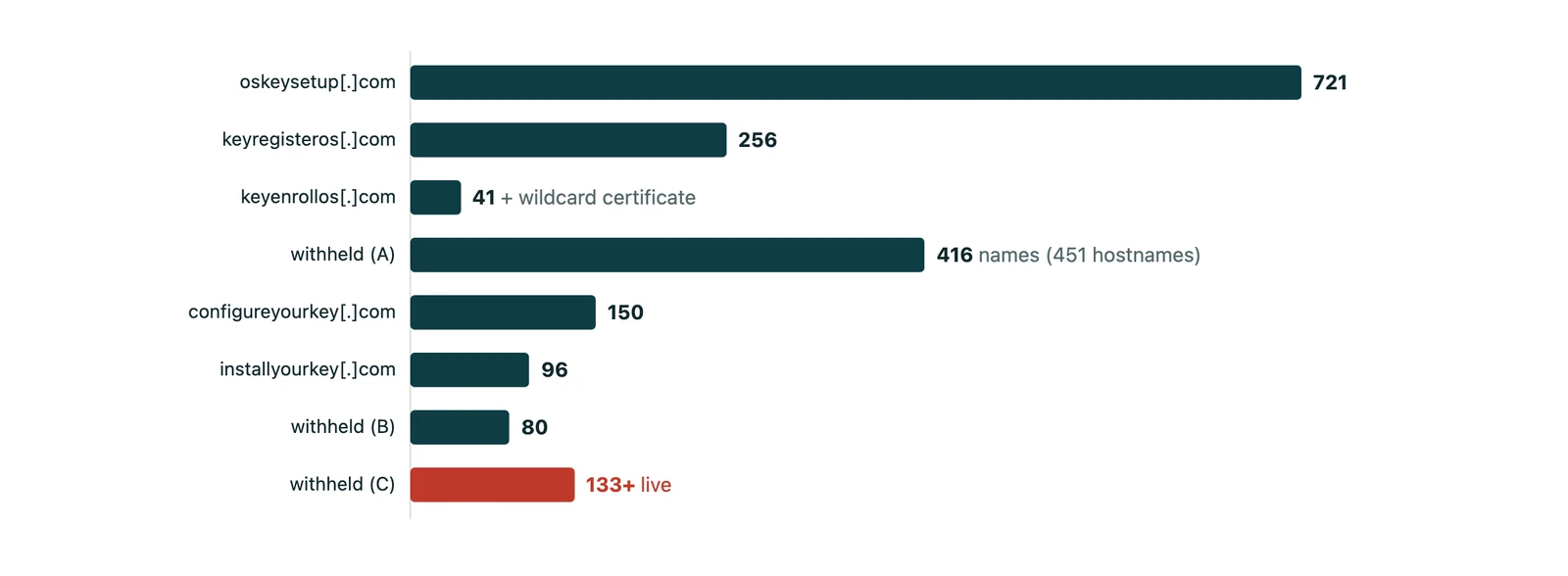
The operator has registered eight domains since 21 July 2026. Each one hosts a subdomain per targeted company. Across the eight we counted 1,892 company subdomains in public Certificate Transparency logs, covering about 1,430 different organisations. 29 organisations appear in three or more waves.
When a domain was suspended, a replacement was often registered within two days.
Three names are withheld. Three of the eight domains had not been taken down when we published. Their names are withheld until takedown wherever they would appear, and they are missing from the indicator list and the hunting query. We will add them once they are down. The organisations we could reach already have them.
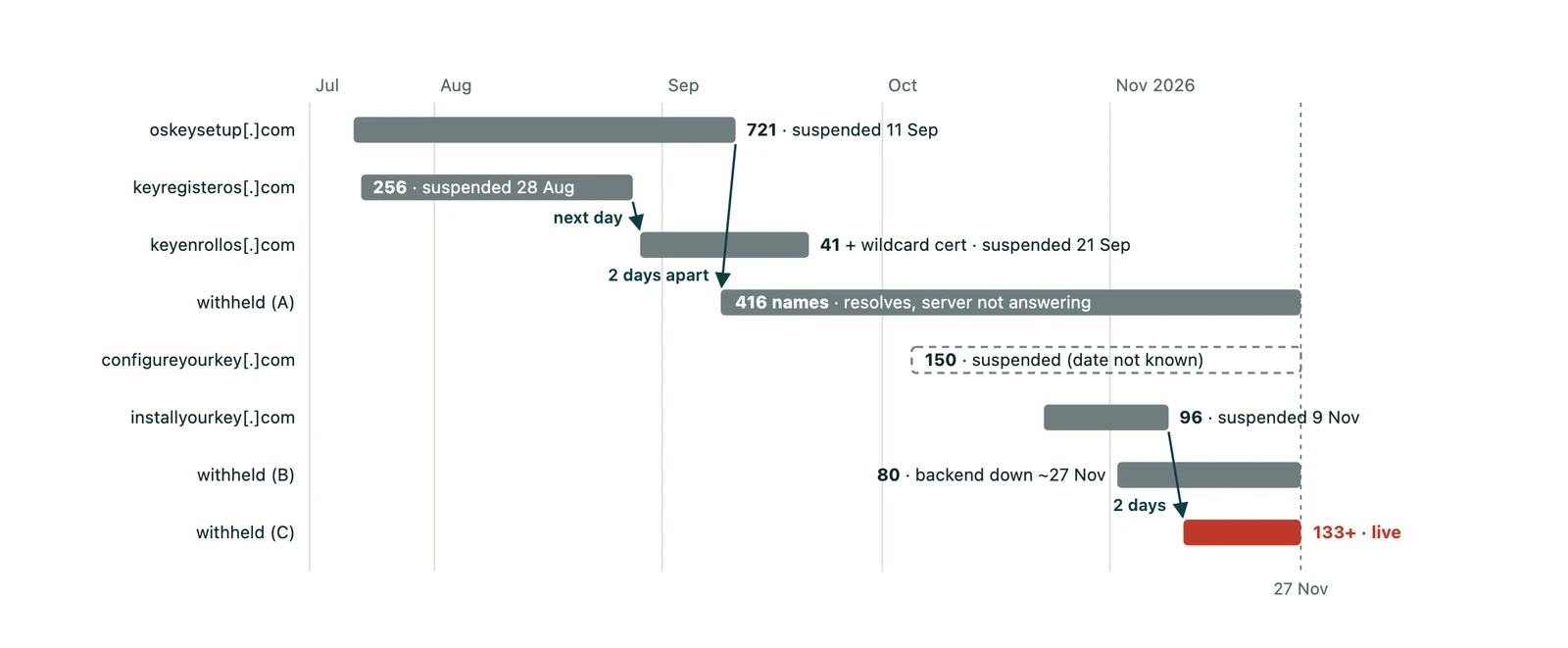
| Domain | Registered | Registrar | Company subdomains | Status, 27 Nov 2026 |
|---|---|---|---|---|
oskeysetup[.]com |
21 Jul | Internet Domain Service BS | 721 | Suspended 11 Sep |
keyregisteros[.]com |
22 Jul | NiceNIC | 256 | Suspended 28 Aug |
keyenrollos[.]com |
29 Aug | Dominet (HK) | 41 + wildcard certificate | Suspended 21 Sep |
| withheld until takedown (domain A) | 9 Sep | Internet Domain Service BS | 451 hostnames / 416 names (certificates 9–11 Sep) | Not suspended; resolves to a server in Ukraine that refuses connections |
configureyourkey[.]com |
5 Oct | Dominet (HK) | 150 | Suspended by registrar (moved to suspension nameservers) |
installyourkey[.]com |
23 Oct | Dominet (HK) | 96 | Suspended 9 Nov |
| withheld until takedown (domain B) | 2 Nov | Dominet (HK) | 80 | Backend down since about 27 Nov (Cloudflare error 1033) |
| withheld until takedown (domain C) | 11 Nov | Dominet (HK) | 133+, new certificates 24 Nov | Live (backend answers) |
How sure we are
Six of the eight domains are confirmed by the kit itself: the page code names api.<domain> as its backend, or we captured the page live.
The other two, oskeysetup[.]com and withheld domain A, are linked by their target lists. They share 243 company names with the confirmed domains, use the same naming pattern, and their dates fill the gaps in the sequence. We did not capture the kit on them.
A public LinkedIn post on 27 November independently tied withheld domain A to the same "IT passkey enrolment" theme and counted more than 450 subdomains.
No ninth domain yet
On 27 November we fetched all 85 connect-pages- sites that had appeared in certificate logs since 18 November. 72 served the kit, and every one reported to the backend on withheld domain C, the live one. A random sample of 150 older pages pointed only at four of the eight backends. None had moved to a new domain. Across all dates there are 1,526 connect-pages- hostnames in the logs.
What the page does
This description comes from a live capture: a 311,622-byte page titled "Account access".
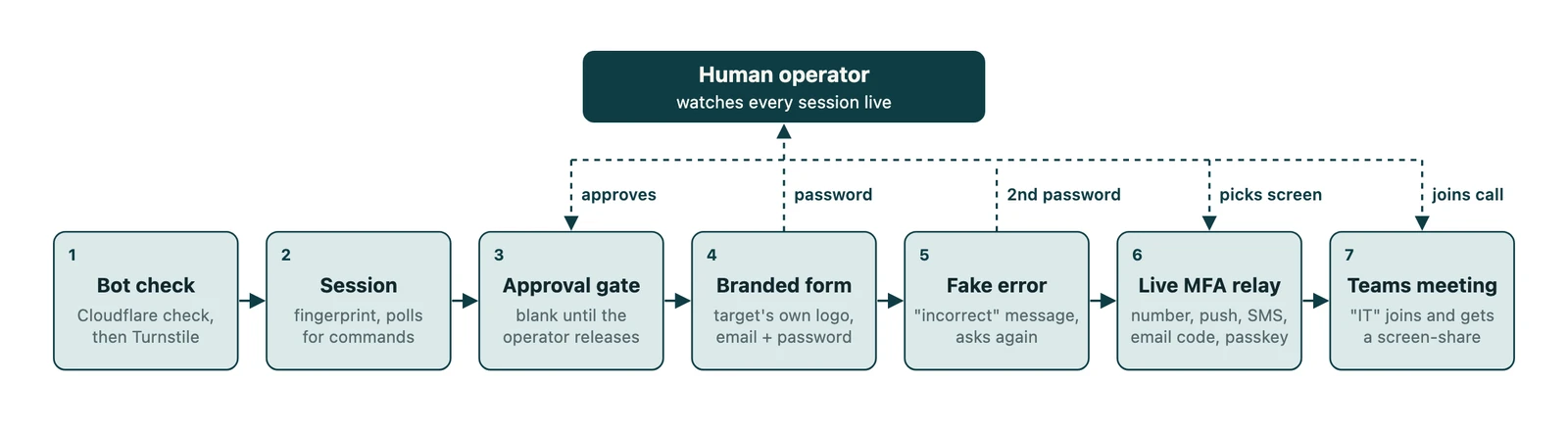
- Bot check. A Cloudflare bot check, then Turnstile. Public sandboxes stop here or at a blank spinner.
- Session and fingerprint. The page calls
/api/v1/sessionflow/key-exchange,/startand/state/report_data, then polls/commandsabout once a second. Older captures show STUN lookups (stun.cloudflare.com,stun.l.google.com) to learn the visitor's real IP address. - Approval gate. A block of code named
__APPROVAL_GATES__keeps the page empty until the operator releases the visitor. - Branded form. A Microsoft 365-style "Account access" form appears with the target's real tenant logo, background and organisation name (
RESOLVED_ORG_NAME). It asks for the email, then the password: plain credential harvesting, with a person watching. The password is sent at once by a function calledreportCredentialAttempt, as apassword_submitevent. AsendToTelegram(email, password)function exists on the page but is empty. - Fake error. "Your account or password is incorrect" appears, and the page collects a second password.
- Live MFA relay. The kit has screens for number matching, push approval, SMS code, email code and passkey. The operator picks the one that matches what the real sign-in is asking for.
- "Join your IT representative". The employee is told to open Teams, start a meeting, paste the Meeting ID and passcode into the page, and wait for "IT" to join. That gives the caller a live screen-share.
The lure
The domain names read like a script: OS key setup, key register, key enrol, configure your key, install your key, and three more in the same vein that we are withholding for now.
The kit mentions passkeys more than 170 times.
Our assessment is that the lure runs along these lines: "This is IT. We're moving everyone to security keys. Sign in here so we can enrol yours." We have not seen a lure message, so treat that as an assessment, not an observation.
Public reports on the wider cluster describe vishing calls from people posing as IT staff. The kit's final screen, which asks the employee to join a Teams meeting with "IT", fits that pattern.
Who is targeted
The targets are overwhelmingly US organisations with a few thousand staff:
- hospital systems and health insurers
- pharmaceutical companies and clinical research
- medical device makers
- asset managers and trading firms
- mortgage lenders
- utilities
- engineering and construction
- logistics and ports
- law firms
- enterprise software
What they have in common is staff whose logins open patient records, client money or other companies' systems.
Being targeted is not being breached. A subdomain in an organisation's name means the operator prepared a page for it. It does not mean anyone visited the page or signed in. We name no targeted organisation in this article.
What happens after a sign-in
We have not observed what follows a successful sign-in. Four public reports describe it, and we summarise them here.
The kit we captured is identical, function for function, to pages on domains that Google Threat Intelligence, Arctic Wolf, Security Risk Advisors and eSentire have publicly tied to a vishing-and-extortion cluster. Google tracks it as UNC6671; Arctic Wolf tracks it as PREY-0058.
The link from those reports to the newer domains in this article is PhishEye's own. It rests on identical code. We claim nothing beyond that.

According to those reports, after a successful sign-in the attacker:
- Persistence: adds their own authenticator or passkey to the account.
- Cover: deletes the emails that warn the employee about an MFA change.
- Collection: runs scripted bulk downloads from SharePoint, OneDrive, mail and connected SaaS applications.
- Extortion: sends an extortion email with a 72-hour deadline, or a Tox or Session contact, with threats to leak the data. There is no encryption.
How we found it
Our certificate monitor reads the public Certificate Transparency logs with no brand list. It visits new sites and groups pages that share code, a backend or a naming pattern.
On 21 November 2026, 38 "Account access" pages that looked like 38 unrelated brands collapsed into one cluster.
Listing every certificate on the backend domain turned 38 pages into 118 companies. Code pointing at older backends, plus certificate searches for the naming pattern, led back through seven earlier domains to July.

Why brand-first tools miss it
Tools that search for names resembling a brand cannot see this. oskeysetup resembles nobody.
Some sign-in sites sit at connect-pages-<company>.pages[.]dev. That is under Cloudflare's own domain, with Cloudflare's certificate. Certificate Transparency searches on the attacker's domains, such as crt.sh queries, miss every one of those Pages sites.
The lesson for anyone hunting this: enumerate the backend, not the pages. We described a related blind spot, a brand placed in the subdomain of an unrelated domain, in The phishing page brand tools cannot find.
A second cluster with the same theme
While checking for a ninth domain on 27 November, we found a second set of domains built on the same "IT security setup" idea.
- Eight domains registered between 22 October and 24 November through NiceNIC and CNOBIN, with Cloudflare DNS. By 27 November five were on client hold, one had no address record, and two were live. Five are listed in the indicators below; the other three are withheld until takedown.
- They use wildcard certificates only, so the names of the targeted companies never appear in Certificate Transparency logs. We saw targets only in public urlscan.io scans: 35 names, mostly law firms, with pharma and medical devices, finance, enterprise software and media.
- The kit is a Microsoft sign-in reverse proxy (paths
/common/oauth2/v2.0/authorize/and/sign-in/) behind a "Verify you are human" gate. A visitor who does not pass sees a decoy: a fake Chrome "This site can't be reached" error.
The names follow the same pattern as the operation above: "os" and "it" prefixes, "my … setup", "configure my passkey". But the kit is different, and only 3 of its 35 target names are also on the operation's target list. We treat it as a related cluster with the same theme, not as the same operator.
As with the main operation, a name in a scan is a target, not a breach.
What we did
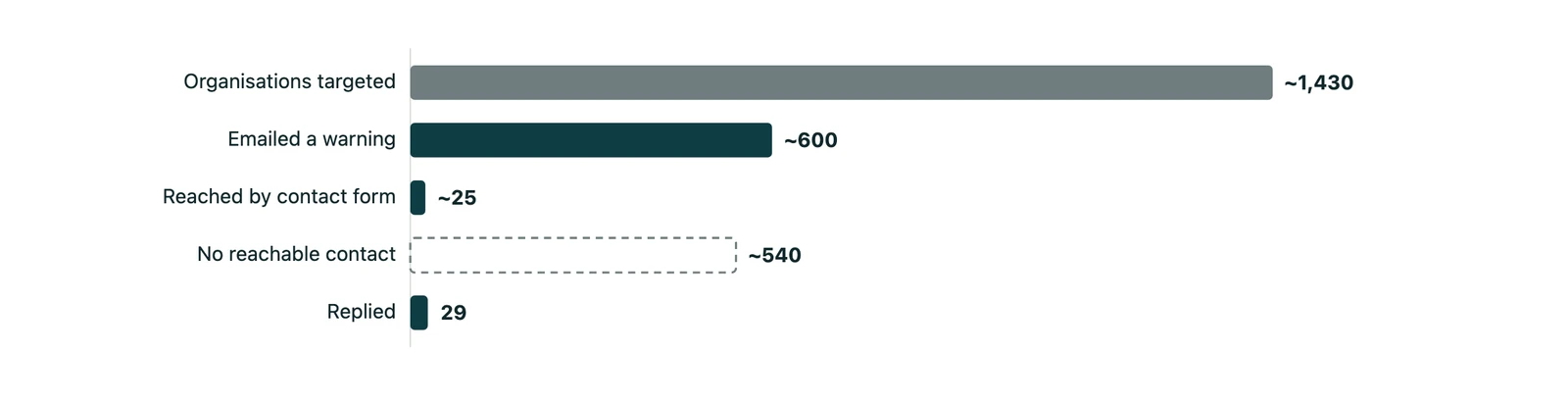
Between 23 and 27 November 2026 we tried to warn every targeted organisation we could reach.
- We emailed a warning to about 600 organisations at a published or verified security contact. The bulk round on 25–26 November sent 484; earlier rounds on 23–25 November covered targets of
keyenrollos[.]comand two of the withheld domains. - We reached about 25 more through website contact forms.
- About 540 organisations had no reachable published contact. 37 warnings bounced.
- 29 organisations replied. Security teams confirmed receipt, checked logs, filed their own takedowns or asked for evidence. Several were already investigating.
The usual requests were for certificate entries, the page hash, first-seen dates and other hosts in the organisation's name. Each organisation that asked received a private TLP:AMBER briefing with its own entry filled in.
We filed no takedown for any organisation that asked us not to. Some ran their own.
What to check now
- Logs. Search mail, proxy and DNS logs back to 21 July 2026 for the domains listed below and for
connect-pages-. - Sign-ins. Look for sign-ins from unfamiliar devices shortly after any visit, and for new MFA methods, passkeys or devices registered since July.
- Calls and meetings. Ask the help desk and staff about calls from "IT" about key or passkey enrolment, and about Teams meetings joined by an unknown "IT" participant.
- Blocking. Block the domains and the page pattern. Old pages have been re-pointed at newer backends, so a dead page can come back.
A hit in the logs means someone loaded a page. It does not by itself mean a password was entered. Follow it up with the sign-in and MFA checks above.
Indicators
All indicators are defanged.
oskeysetup[.]com  keyregisteros[.]com  keyenrollos[.]com  configureyourkey[.]com  installyourkey[.]com
(three more domains withheld until takedown)
<company>.<any of the above>    api.<any of the above>
connect-pages-<company>.pages[.]dev  (also -<3 char> suffixes, connect-pages-core-auth-<company>)
Page title: "Account access"
Paths: /api/v1/sessionflow/key-exchange  /start  /commands  /touch  /state  /state/report_data
Files: /preview/mobile-login.css  /branding/org-logo.png  /branding/background.jpg
Code markers: __APPROVAL_GATES__  RESOLVED_ORG_NAME  reportCredentialAttempt

Second cluster (same theme, different kit; see above):
mfasetupportal[.]com  myssosetup[.]com  itmfasetupportal[.]com  mysso-setup[.]com  mypasskeyenroll[.]com
(three more domains withheld until takedown)
Paths: /common/oauth2/v2.0/authorize/  /sign-in/
31.56.52[.]46 (origin of mfasetupportal)
31.57.37[.]181 (origin of mypasskeyenroll; VPS Dedicated LLC, AS197769)
Hunting query (Microsoft Defender / Sentinel KQL)
The query searches DeviceNetworkEvents, DnsEvents and UrlClickEvents. It keeps the indicators defanged and restores them when it runs. Tables you do not have are skipped. Defender advanced hunting keeps 30 days of data by default, so run it in Sentinel or your long-term store to reach back to July.
// PhishEye: "key setup" sign-in trap domains, July-November 2026
// Indicators stay defanged here; the query re-fangs them at run time.
let start = datetime(2026-07-21);
let defanged = dynamic([
    "oskeysetup[.]com", "keyregisteros[.]com", "keyenrollos[.]com",
    "configureyourkey[.]com", "installyourkey[.]com",
    // second cluster: same theme, different kit
    "mfasetupportal[.]com", "myssosetup[.]com", "itmfasetupportal[.]com",
    "mysso-setup[.]com", "mypasskeyenroll[.]com"]);
// Further domains are withheld until takedown and will be added here.
let domains = toscalar(
    print d = defanged
    | mv-expand d to typeof(string)
    | summarize make_list(replace_string(d, "[.]", ".")));
let ips = toscalar(
    print i = dynamic(["31.56.52[.]46", "31.57.37[.]181"])
    | mv-expand i to typeof(string)
    | summarize make_list(replace_string(i, "[.]", ".")));
let pages = "connect-pages-";
union isfuzzy=true
    (DeviceNetworkEvents
     | where Timestamp >= start
     | where RemoteUrl has_any (domains) or RemoteUrl contains pages or RemoteIP in (ips)
     | project Time = Timestamp, Source = "DeviceNetworkEvents", Device = DeviceName,
               Account = InitiatingProcessAccountUpn,
               Indicator = iff(isnotempty(RemoteUrl), RemoteUrl, RemoteIP)),
    (DnsEvents
     | where TimeGenerated >= start
     | where Name has_any (domains) or Name contains pages
     | project Time = TimeGenerated, Source = "DnsEvents", Device = Computer,
               Account = "", Indicator = Name),
    (UrlClickEvents
     | where Timestamp >= start
     | where Url has_any (domains) or Url contains pages
     | project Time = Timestamp, Source = "UrlClickEvents", Device = "",
               Account = AccountUpn, Indicator = Url)
| sort by Time asc
Sources
- Google Threat Intelligence: UNC6671 Rebrands: Multi-Brand Vishing Extortion Targets Financial Services and Enterprise Cloud Environments (7 August 2026)
- Arctic Wolf: Active Cloud Data Theft and Extortion Campaign Targeting Microsoft 365 and SaaS Platforms (3 September 2026), the cluster it tracks as PREY-0058
- Security Risk Advisors: Help Desk Vishing and Fake Passkey Enrollment Driving Mass SharePoint Exfiltration (23 October 2026)
- eSentire: Increase in Impersonation Vishing Attacks Leading to Data Extortion (3 November 2026)
- Certificate Transparency, the public logs behind every count in this article
- Microsoft: How number matching works in Microsoft Authenticator
- Cloudflare: Turnstile
- FIRST: Traffic Light Protocol
Everything in "What happens after a sign-in" comes from the first four reports. Everything else is PhishEye's own observation, from public certificate logs and captured pages.
- PhishEye: The phishing page brand tools cannot find
- PhishEye: SharePoint phishing on Cloudflare Workers
- PhishEye: Device-code phishing: a live specimen
- PhishEye: VoteDrain: the fake crypto vote that rewrites itself on-chain
- PhishEye: How fast do phishing sites come down?
- PhishEye: How to take down a phishing website
About PhishEye
PhishEye is a digital-risk-protection company that watches for look-alike domains, phishing pages and brand impersonation. It is operated by Cyber Deans LTD, registered in the UK. phisheye.com