
Device-Code Phishing: A Live Specimen
Published 12 min read
Contents
TL;DR — A live phishing site,
request-questionnaires[.]com, shows a Microsoft-branded page reading "Microsoft requests permission to access your work account and data," displays a real Microsoft authorization code, and instructs the victim to copy it and click Continue. Continue opens the genuinelogin.microsoftonline.com/common/oauth2/deviceauth. There is no fake login page, no password to steal, and MFA does not help: the victim authenticates on Microsoft's own infrastructure and hands the attacker live access and refresh tokens. The domain was registered 16 days ago, sits behind Cloudflare, and returns HTTP 403 to every automated scanner we tried.
About this analysis. First-hand PhishEye Threat Research. Built from screenshots of the live flow supplied by the recipient, plus passive OSINT only — whois, DNS, certificate transparency, urlscan, and abuse.ch. We did not visit or interact with the phishing site, and no code was entered at Microsoft. Indicators are defanged. Captured 24 August 2026. This is a working specimen of the technique Unit 42 documented and we covered in device-code phishing evasion techniques.
What makes this one worth writing up
Most credential phishing has a tell you can point at: a lookalike domain in the address bar, a cloned login form, a certificate that does not belong. This has none of them.
The victim's password is never typed into anything the attacker controls. The sign-in happens on login.microsoftonline.com, with Microsoft's real certificate, on Microsoft's real infrastructure. Multi-factor authentication is completed — correctly, by the legitimate user, on the legitimate site. And at the end of it the attacker holds a valid access token and a refresh token for that account.
This is device-code phishing: abuse of the OAuth 2.0 device authorization grant, the flow designed for signing into TVs, CLIs, and other input-constrained devices. The attacker is not stealing a credential. They are persuading the victim to authorize the attacker's session.
The flow, exactly as observed
Three stages, all Microsoft-branded.
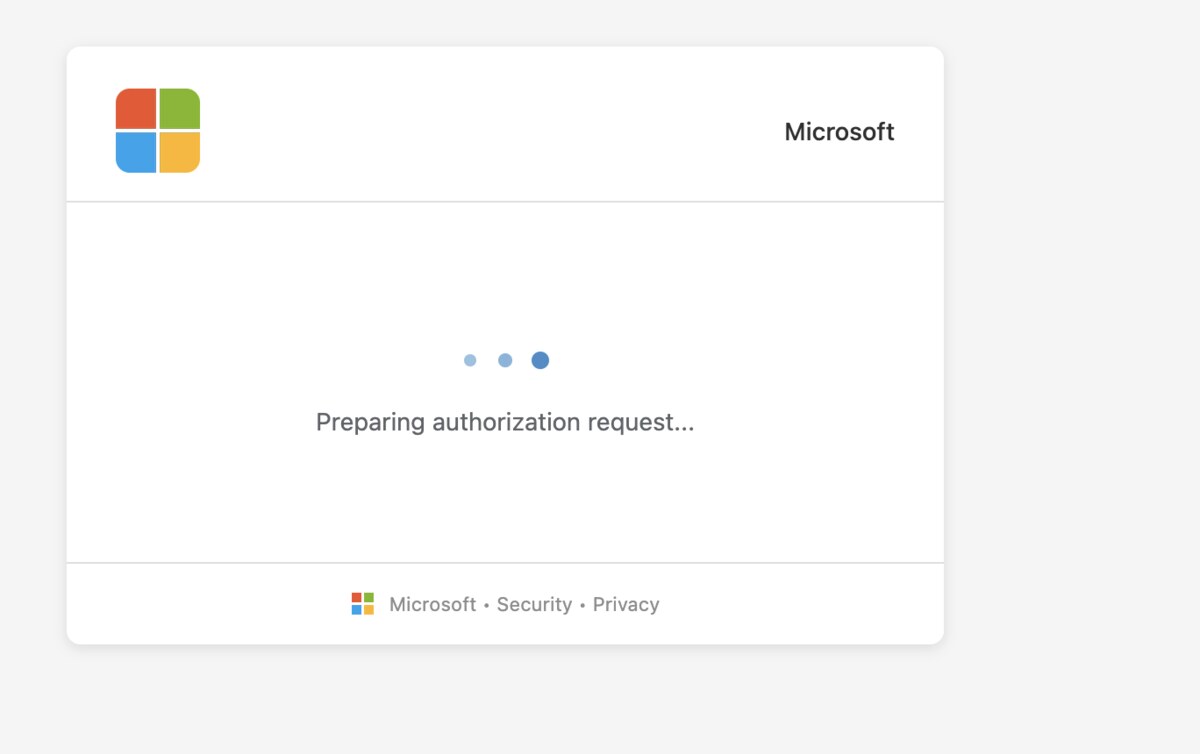
Stage one is a stall. A page carrying the Microsoft four-square logo and a "Microsoft · Security · Privacy" footer shows an animated loader and the text "Preparing authorization request…".
That screen is not decoration, and it is the most technically interesting part of the whole campaign. Device codes are short-lived — Microsoft's user codes typically expire in around 15 minutes. A code hardcoded into a phishing page would be dead long before most victims arrived. The loader is almost certainly the attacker's backend making a live device authorization request to Microsoft at that moment, so the code the victim is about to see is fresh and inside its validity window. The campaign generates a working code on demand, per visitor.
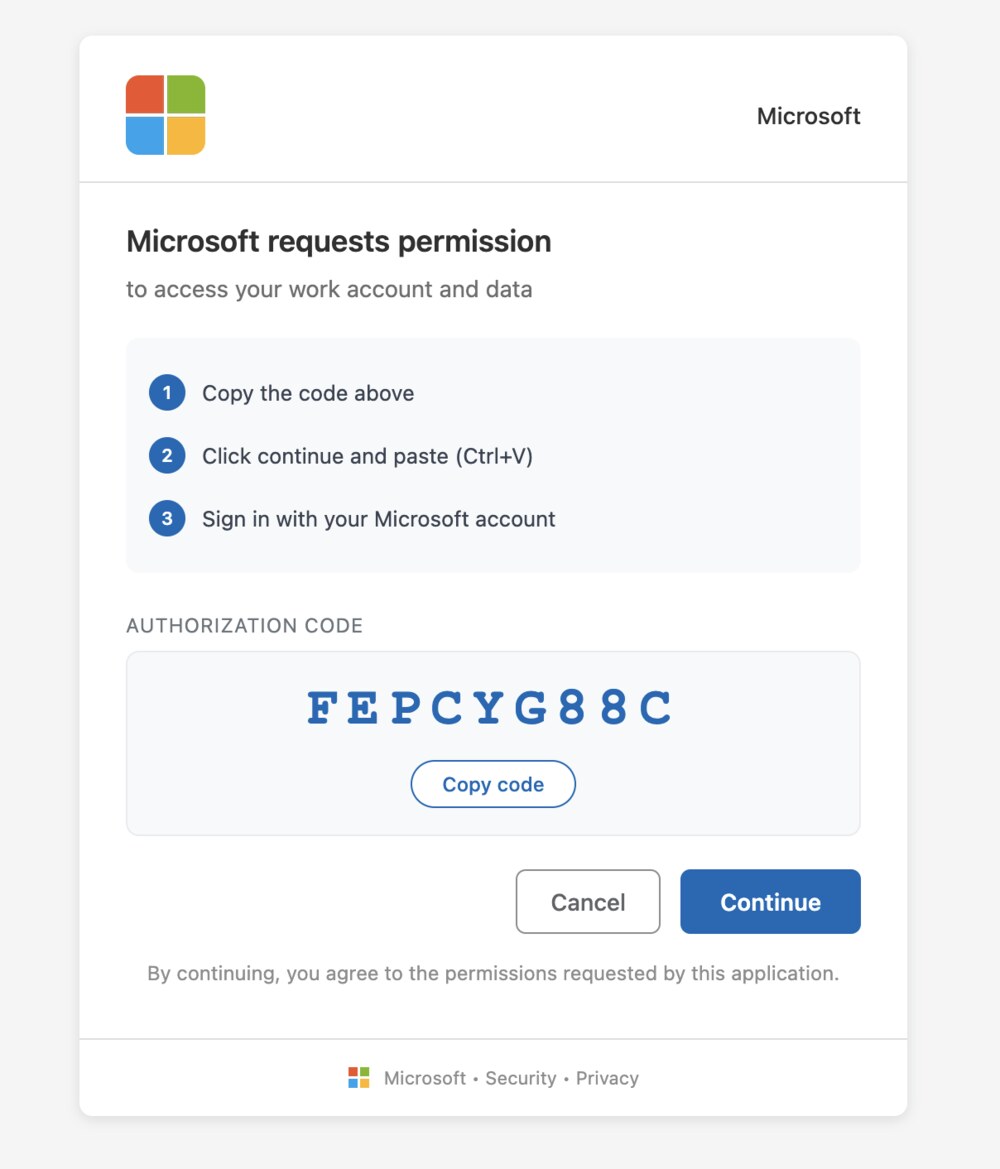
Stage two is the instruction. The page reads "Microsoft requests permission — to access your work account and data," followed by three numbered steps:
- Copy the code above
- Click continue and paste (Ctrl+V)
- Sign in with your Microsoft account
Beneath that: AUTHORIZATION CODE, a nine-character code in large type — in the captured instance FEPCYG88C — and a Copy code button, with Cancel and Continue.
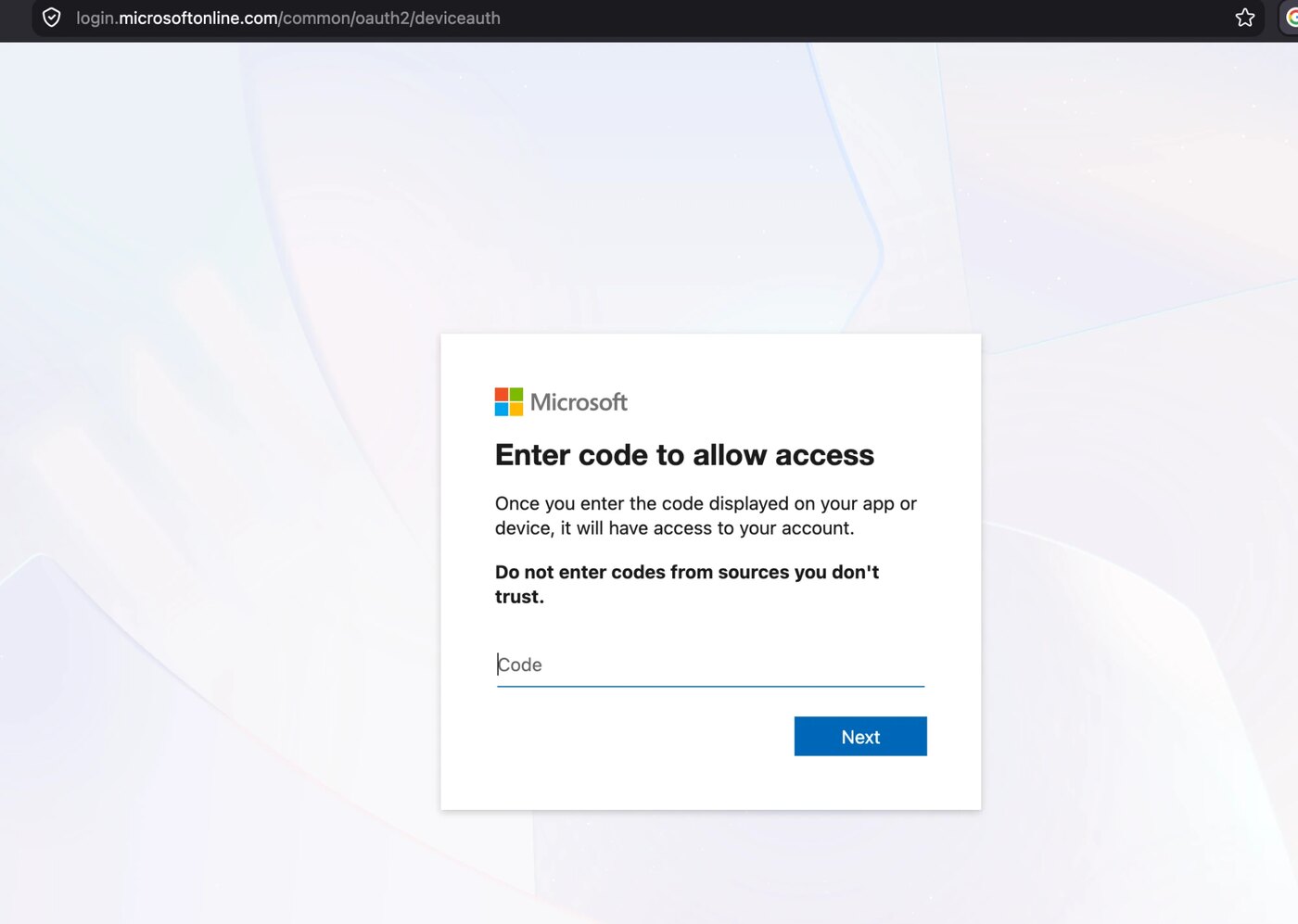
Stage three is Microsoft. Continue opens login.microsoftonline[.]com/common/oauth2/deviceauth — the authentic Microsoft device-authorization page, headed "Enter code to allow access." The victim pastes the code, signs in, satisfies MFA, and consents.
At that point the attacker's polling session receives tokens for the account.
The instruction is engineered to defeat Microsoft's own warning
As Stage 3 above shows, the genuine Microsoft page carries a warning in bold, directly above the code field:
Do not enter codes from sources you don't trust.
Microsoft put that there for precisely this attack. The phishing page is built to walk the victim straight past it, in two ways.
First, the page claims the requester is Microsoft: "Microsoft requests permission to access your work account and data." A victim who reads the warning and asks themselves "do I trust the source?" has just been told the source is Microsoft. The warning is answered before it is asked.
Second, the three-step instruction front-loads the copy action. By the time the victim reaches Microsoft's page they are executing step 2 of a process they have already committed to, with the code on their clipboard. The warning arrives mid-task, when the psychological cost of stopping is highest.
This is the same design goal behind the evasion techniques Unit 42 catalogued — CAPTCHA gates, SaaS chains, blob URLs — applied to the human rather than the scanner.
What the infrastructure says
Passive OSINT on request-questionnaires[.]com gives a consistent picture of disposable, automated setup.
The domain was created 2026-08-08 20:40:24 UTC and updated five minutes later at 20:45:11, when Cloudflare nameservers were set. At the time of writing it is 16 days old — malicious-by-registration, not a compromised legitimate site. It is registered through PDR Ltd. (PublicDomainRegistry.com) with the registrant organization withheld and the country listed as US.
It resolves to Cloudflare (172.67.138[.]225, 104.21.78[.]247) on the mina/moura.ns.cloudflare[.]com nameservers, so the origin host is hidden. There is no MX record, which tells you this domain is a landing page, not the sender — the lure arrives from somewhere else, and the domain name itself (request-questionnaires) points at a survey or questionnaire pretext, matching the SaaS-flavoured lures documented in this technique.
Two findings matter operationally. Every automated request we made returned HTTP 403 from Cloudflare, with both a curl user-agent and a full browser user-agent string. And urlscan.io holds zero public scans of the domain. Whether that is deliberate cloaking or Cloudflare's default bot protection, the effect is the same: the page renders for a human in a browser and refuses everything else, which is exactly why no scanner has rated it.
Why this defeats controls that normally work
- There is no credential to phish. The attacker never sees the password, so credential-reuse detection and password-spray analytics see nothing.
- MFA is satisfied, not bypassed. The legitimate user completes it. Conditional Access policies keyed on "MFA completed" pass.
- No lookalike domain to detect. The sign-in URL is Microsoft's own. Brand-monitoring built around lookalike login pages does not fire on the domain that matters.
- Only one asset to take down, and it is behind Cloudflare with a hidden origin. Suspending it does not touch the tokens already issued.
- A password reset does not evict the attacker. Access tokens are short-lived, but the refresh token keeps working until sessions are explicitly revoked. This is the single most common incident-response mistake with this technique.
What defenders should do
Block the flow if you do not need it. In Entra ID, a Conditional Access policy that blocks the device code flow removes the entire attack class. Most organizations have no legitimate need for it outside a small set of shared or input-constrained devices, and those can be scoped as exceptions. This is the definitive control — everything below is compensating.
Hunt for it in sign-in logs now. Filter Entra ID sign-in logs on the device code authentication protocol. Legitimate use is rare and predictable; a device-code sign-in from an unusual IP, ASN, or country against a normal user account is a strong signal. Because the sign-in itself succeeds cleanly, this will not appear in failed-login reporting.
Revoke sessions, not just passwords. If you suspect a device-code compromise, reset the password and revoke refresh tokens and active sessions for the account, then review and remove any OAuth application consents the user granted.
Block and report the infrastructure. Add the domain to DNS and proxy blocklists, and report it to the registrar and to Cloudflare — the PDR abuse contact is published in whois, and the CDN report is a separate path because the origin is masked. Given that no public scanner has seen this domain, submitting it to Safe Browsing, SmartScreen, and APWG has outsized value here.
Train the specific tell, not the generic one. "Check the URL" fails against this attack, because the URL is correct. The rule that works: no legitimate process ever asks you to copy a code from a web page and paste it into microsoftonline.com. If a page hands you a code and sends you to Microsoft to enter it, that is the attack, regardless of how well-branded the page is.
The wider point is one we keep returning to: enforcement alone is not a defense here. Removal takes hours at best, the tokens are issued in seconds, and the same operator can register another questionnaire-themed domain in minutes. The controls that actually contain this are the ones you own — the Conditional Access policy, the log query, and the session revocation. That is the argument for containment running in parallel with takedown, not after it.
Indicators (first-hand, defanged)
Re-fang by replacing [.] with .. Handle in isolation; do not visit.
# Phishing domain
request-questionnaires[.]com          # created 2026-08-08 20:40:24 UTC
Registrar:      PDR Ltd. d/b/a PublicDomainRegistry.com
Abuse contact:  abuse-contact@publicdomainregistry[.]com
Registrant:     org withheld, country US
MX:             none (landing page only, not the sender)

# Hosting (Cloudflare-fronted, origin hidden)
172.67.138[.]225
104.21.78[.]247
mina.ns.cloudflare[.]com
moura.ns.cloudflare[.]com

# Observed behaviour
HTTP 403 to automated clients (curl and browser UA alike)
0 public urlscan.io scans at time of writing

# Abused legitimate endpoint (NOT malicious - do not block)
login.microsoftonline[.]com/common/oauth2/deviceauth

# Sample authorization code shown in the captured flow (expired; codes are per-visitor)
FEPCYG88C
One caution on that last block: the Microsoft device-authorization URL is a legitimate endpoint. Blocking it outright will break real device sign-ins. The control is the Conditional Access policy on the flow, not a URL block.
FAQ
Is this a fake Microsoft login page?
No, and that is what makes it dangerous. The sign-in happens on the genuine login.microsoftonline.com with Microsoft's real certificate. The only attacker-controlled page is the one that displays the code and tells you to copy it.
Does MFA protect against device-code phishing? No. The victim completes MFA legitimately on Microsoft's own site. The attacker never needs to defeat it, because the authenticated session is bound to the code the victim entered on their behalf.
Is resetting the password enough to recover? No. Refresh tokens issued during the flow keep working after a password change. You must revoke refresh tokens and active sessions, and review any OAuth consents granted by the account.
How do I tell if we have been hit? Query Entra ID sign-in logs for the device code authentication protocol. Successful device-code sign-ins from unexpected locations or ASNs against ordinary user accounts are the indicator; nothing will appear in failed-sign-in reporting.
What is the single most effective control? A Conditional Access policy blocking the device code flow for everyone who does not demonstrably need it. It eliminates the technique rather than mitigating it.
Sources
- First-hand PhishEye Threat Research, 24 August 2026: screenshots of the live flow supplied by the recipient, plus passive OSINT (whois, DNS, urlscan.io, abuse.ch). We did not visit or interact with the phishing site.
- Technique background: device-code phishing evasion techniques, our analysis of Unit 42 (Palo Alto Networks) research on CAPTCHA gates, SaaS chains, blob-URL delivery, and source obfuscation in this attack class.
About the authors
PhishEye Threat Research analyzes phishing and brand-impersonation campaigns for defenders. This teardown is based on a live specimen reported to us on 24 August 2026, analyzed from supplied screenshots and passive infrastructure research. No credentials were entered and no authorization code was submitted to Microsoft at any point.