
UKVI Sponsor Licence Phishing: The Fake 2FA Lure
Published 16 min read
Contents
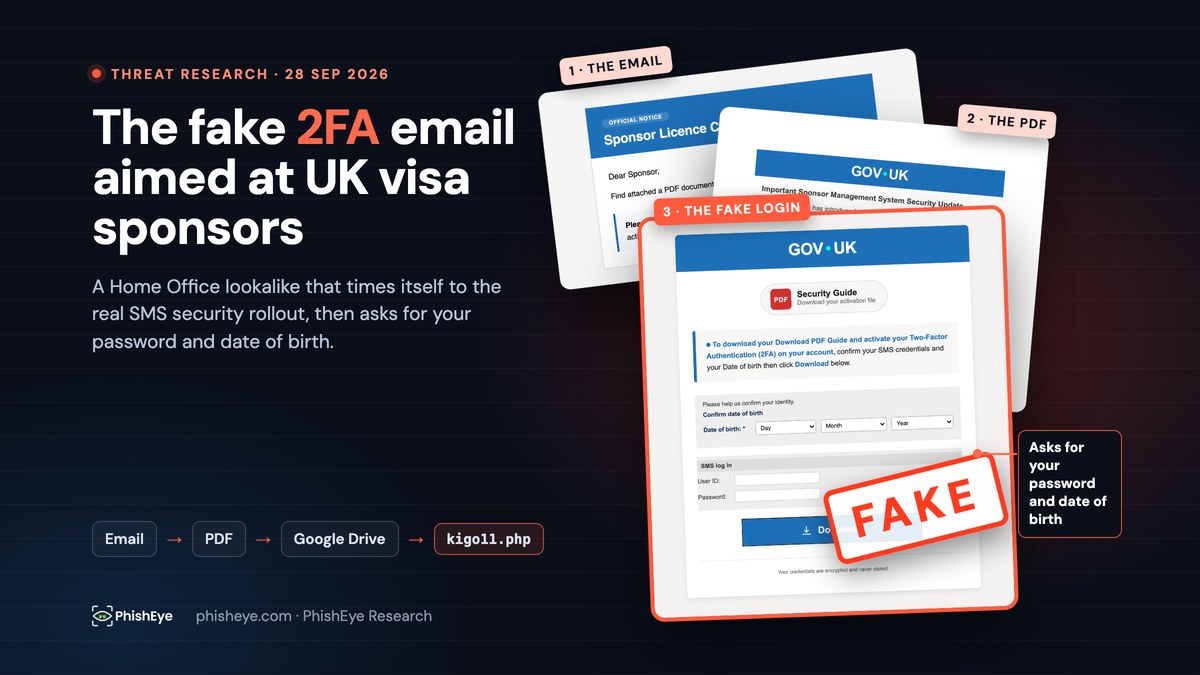
On 28 September 2026 an email signed "UK Visas and Immigration Home Office" reached PhishEye's published contact address. It told us to read an attached PDF about our "sponsor licence compliance". The PDF told us to switch on two-factor authentication for the Sponsorship Management System (SMS), the Home Office portal that UK visa sponsors use to issue Certificates of Sponsorship. The download link inside it pointed to Google Drive, and the file on the other end is a fake SMS log-in page. That page asks for exactly three things: your SMS user ID, your password and your date of birth.
Sponsor licence holders have been receiving phishing emails like this for more than a year. This one is worth dissecting because of its timing. It borrows the wording of a real security change the Home Office began rolling out on 3 September 2026, and it collects the same three details that change asks for.
Safety notice. Attacker hostnames and addresses are defanged as
example[.]comandhxxps://throughout. The Google Drive link is shown only as its file ID. Nothing in this article links to a phishing page. Do not open the attachment or the downloaded HTML file, and do not submit anything to the hosts listed. PhishEye is not affiliated with the Home Office or UK Visas and Immigration.
Key findings
- The lure copies a real rollout. GOV.UK announced mandatory multi-factor authentication for SMS users from 3 September 2026, phased in by November 2026. The fake PDF was generated on 9 September 2026 and demands "2FA activation" by a 21 September deadline.
- Three stages, one of them trusted. A PDF attachment carries a link to a file on Google Drive. That file is an HTML page,
SMSPUG001.html, which the victim opens from their own computer. The only attacker-run web address in the chain is the one that receives the stolen data. - It steals the login and the recovery detail. The page sends the SMS user ID, password and date of birth to
hxxps://client2.tindwononidehub[.]com/kigo11.php, then hands the victim a fake "activation" file and a "system upgrade, log in again after 24 hours" message. - The email passed SPF, DKIM and DMARC. It passed because the sender set up authentication for its own domain,
darinexu[.]com. Passing proves who controls that domain. It says nothing about the Home Office. - The collection domain is new.
tindwononidehub[.]comwas registered on 13 September 2026. The PDF was last modified that afternoon, and the domain's certificates were issued about two hours after registration.
What arrived
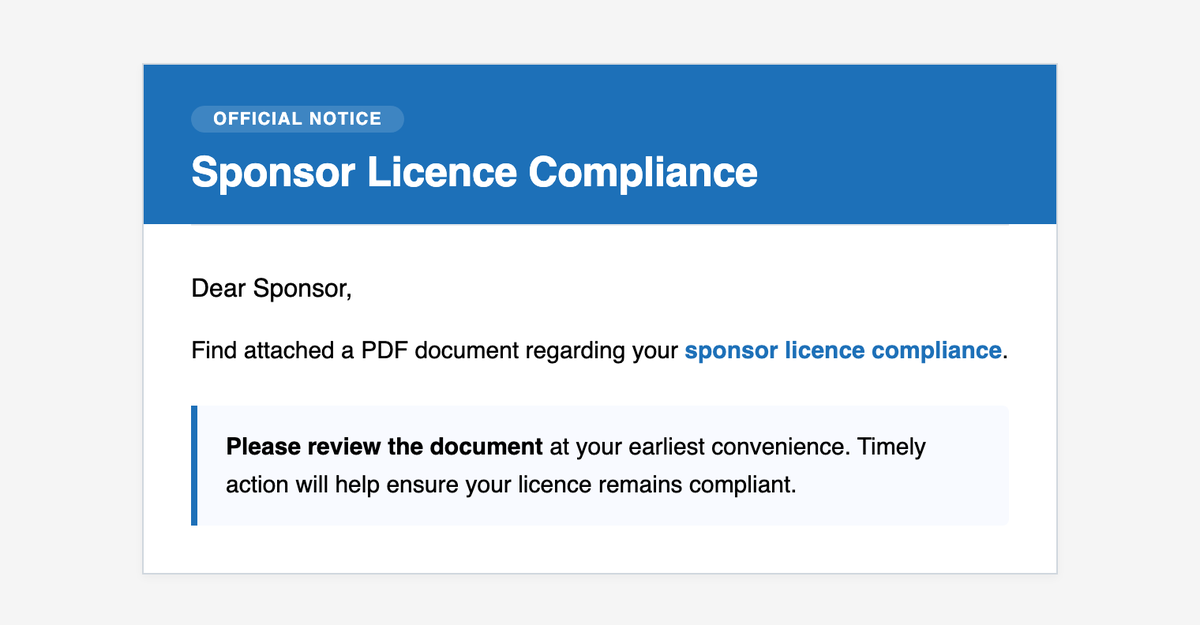
The message is short, with a GOV.UK-style blue banner and no link in the body. Everything that matters is in the headers and the attachment.
| Field | Value as received |
|---|---|
| From | UK Visas and Immigration Home Office <info@darinexu[.]com> |
| To | PhishEye's published contact address |
| Subject | New update uInformation regarding your sponsor licence (typo as received) |
| Date | 28 September 2026, 13:57:59 UTC |
| Sending server | mail.darinexu[.]com, 148.113.247[.]219 (AS16276, OVH) |
| Authentication | SPF pass, DKIM pass (d=darinexu[.]com), DMARC pass |
| Attachment | MFA_User_ Guide.pdf, 45,386 bytes |
Two details are easy to miss.
The authentication results are real, and they don't help you. The sender published SPF, DKIM and a DMARC policy for darinexu[.]com, and signed the message with that domain's key. Every check passed. That tells you the message came from whoever controls darinexu[.]com. Only an address ending in homeoffice.gov.uk could tell you it came from the Home Office. You can inspect a message's headers the same way with our email header analyzer.
The plain-text version is a different scam. Email clients that cannot render HTML fall back to the plain-text part. Here that part is an unrelated advance-fee pitch from a "project facilitator manager" offering to fund "any kind of global enterprise", with a contact address at Outlook. The sender reused a template without cleaning it. It is also a hint that the same mailing setup runs more than one fraud.
The receiving mail filter added the header X-Recommended-Action: reject, and the message was delivered anyway. A verdict header does nothing unless a rule acts on it, so check whether yours does.
The PDF: a fake security notice
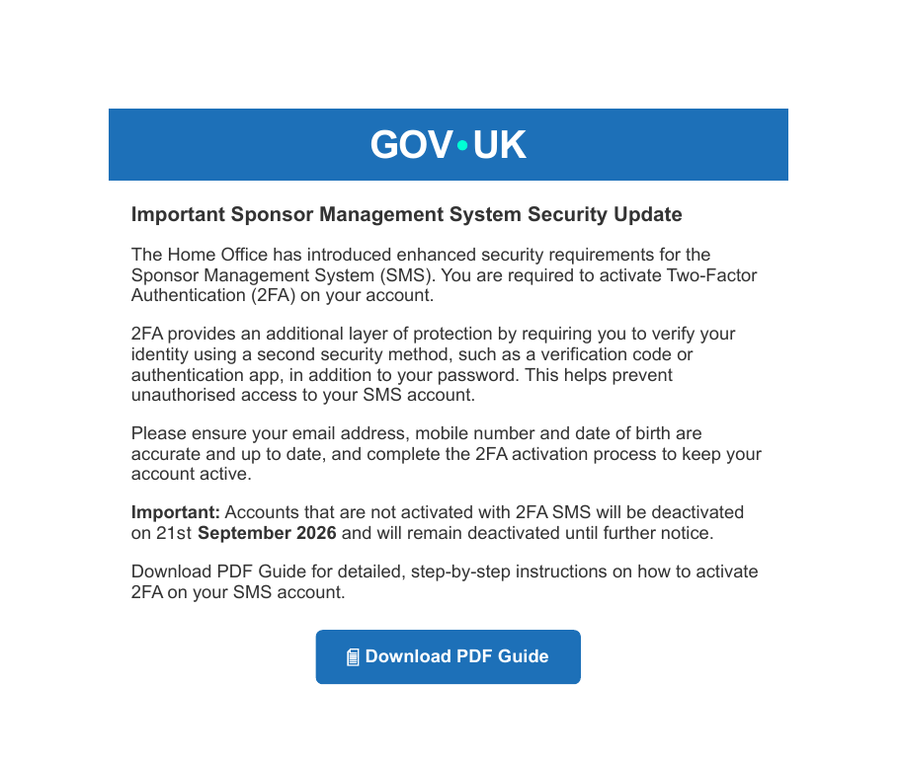
The attachment is a single page styled like a GOV.UK notice. It says the Home Office "has introduced enhanced security requirements for the Sponsor Management System", tells the reader to activate two-factor authentication, asks them to make sure their "email address, mobile number and date of birth are accurate", and warns that accounts not activated "will be deactivated on 21st September 2026".
The document's own metadata shows how it was made. It was printed to PDF by headless Chrome 150 on Linux, with a blank page title (about:blank). It was created on 9 September 2026 and last modified on 13 September 2026. The deadline in the text had already passed by the time the email reached us on 28 September. The operator kept sending the same file after its own deadline expired.
The only active element is the "Download PDF Guide" button. It links to a Google Drive direct-download address with the file ID 1TaN9d3wu-IkuHPDg007QwXY5T2CYszGO. We requested only the response headers for that address, not the file itself. Google returned an attachment named SMSPUG001.html, 64,765 bytes long. That is exactly the size of the copy of SMSPUG001.html we analysed.
Using Google Drive this way has two advantages for the attacker. The link inside the PDF points at a Google domain, which security tools rarely block. And the file it delivers is not a website at all.
The fake SMS log-in page
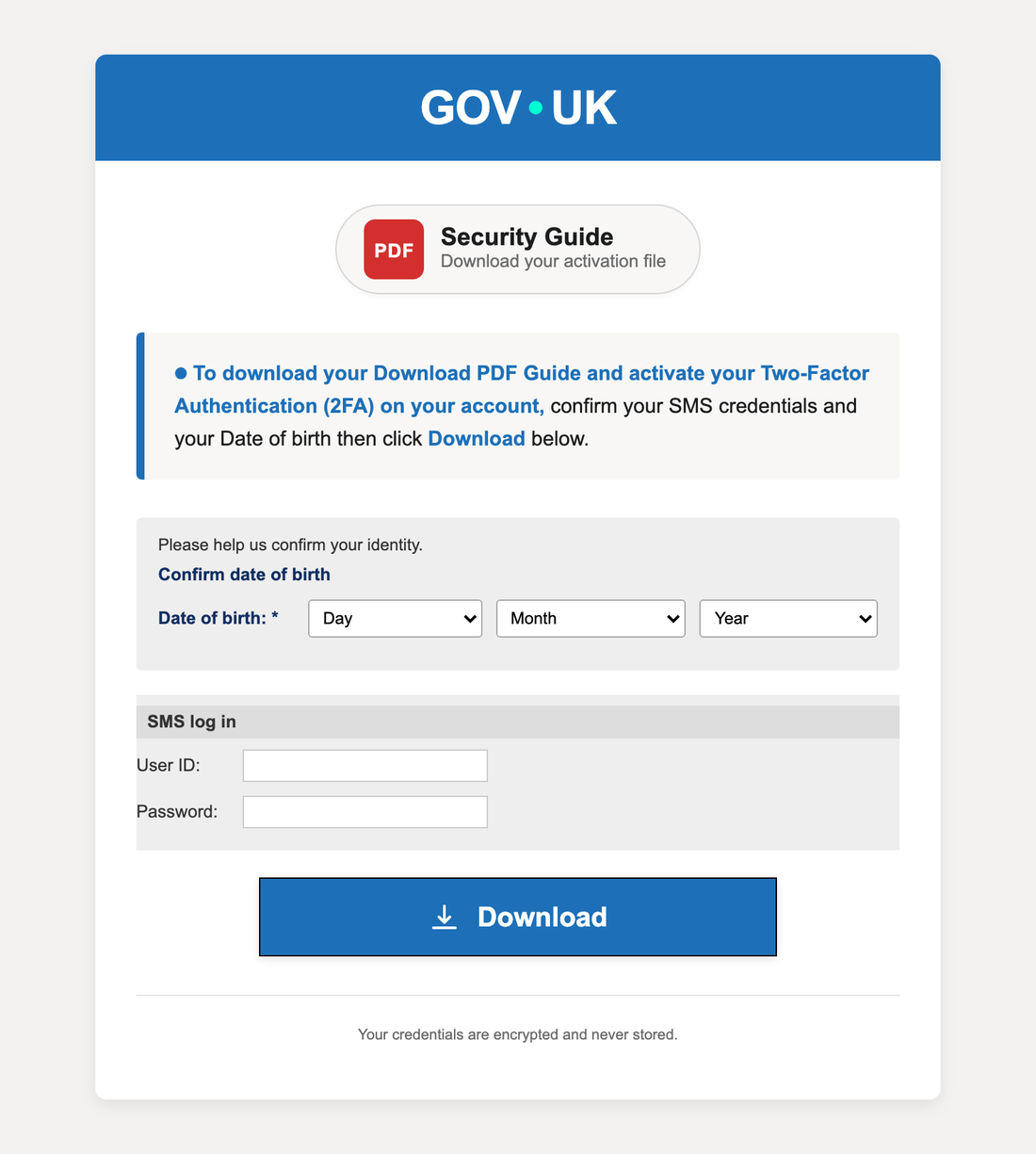
SMSPUG001.html, rendered offline with scripts removed and all network requests blocked. With scripts running, the date drop-downs are filled in and the Download button sends the form.SMSPUG001.html is titled "GOV.UK – SMS Security Activation". It has a GOV.UK header, a "Security Guide" badge, and a form that asks you to "confirm your SMS credentials and your Date of birth" before the "guide" will download. The form copies the real SMS log-in page closely: the same form ID, smslogin, the same field names, j_username and j_password, and the same "SMS log in" and "User ID" labels. The difference is where the form goes. The real form submits to the Home Office's own server; this one is never submitted as a form at all, because the script sends the data elsewhere. A footer says: "Your credentials are encrypted and never stored."
The page runs from the victim's own disk. There is no hosted phishing page for anyone to find, block or take down. All that leaves the victim's computer is the stolen data, sent to one address.
The page's 48 KB script is obfuscated: every string sits in an encoded table and is decoded only while the page runs. We decoded the table without running the page. Here is what the script does:
- It fills in the day, month and year drop-downs, and refuses to continue until a full date of birth is chosen.
- When Download is clicked, it sends the user ID, password and date of birth to
hxxps://client2.tindwononidehub[.]com/kigo11.phpas a standard form post. The script also contains field names for an email address and a country. - If that send fails, it swallows the error, so the victim sees nothing unusual.
The victim is then left with two things:
- A decoy file named
SMS_Security_Activation_….pdf. It is plain text dressed up as a PDF, reading "SECURITY ACTIVATION", the victim's user ID, the date, and "Status: Activated". - A holding message: "We are currently performing a system upgrade. No action is required at this time. Please login again after 24 hours."
Those two matter most. The victim leaves with a file that looks like proof of activation and a reason not to log in again for a day. That gives the attacker a day in which the real account holder is unlikely to notice a changed password or a change of details.
Why the date of birth matters
The date of birth is not decoration. The Home Office's own guide to the new sign-in process, SMS guide 13: multi-factor authentication, first published on 28 August 2026, sets out how it works:
- Each log-in needs the SMS user ID and password plus a one-time passcode. The passcode is sent by text or email from "GOVUK" and is valid for 10 minutes.
- A Level 1 user enters their date of birth when first setting up MFA, and again when changing the mobile number or email address that passcodes are sent to. It must match the date of birth held on the sponsor licence.
The Home Office's sponsor guidance, part 1 gives the timetable. Mandatory MFA began on a phased basis on 3 September 2026 and is expected to cover all sponsors by November 2026. Organisations granted a licence on or after 9 September 2026 get it from the start. Before that, MFA had been trialled with a limited number of sponsors since November 2025.
Set that beside the lure. The fake PDF was generated on 9 September, six days into the real rollout. It asks sponsors to check the same details (email address, mobile number and date of birth) and invents a deadline two weeks later. The fake page collects the password plus the one extra detail the new process uses to confirm a Level 1 user when setting up MFA or changing where passcodes are sent. We have not tested whether the stolen details are enough to take over an account with MFA enabled, and we do not claim they are. What the lure does show is that its author read the real announcement.
The same GOV.UK guide lists what the Home Office will never do. This email does two of them. The Home Office says it will never send "attachments with an embedded link to the SMS log in page or SMS related guidance". It also says it will never ask for your "SMS user ID, password, OTP or personal information such as your date of birth outside of the SMS system".
How this compares with earlier sponsor phishing
Phishing aimed at SMS accounts is not new, and others have documented it before us:
- In August 2025, Mimecast's threat team described a campaign using subject lines such as "A new message has been posted to your Sponsorship Management System". Its links sat behind a captcha and led to cloned log-in pages that posted to
sms.php. - Law firm Lewis Silkin reported the Home Office's warnings to sponsors in July 2025 and again in October 2025. The lures threatened compliance action or account suspension if the recipient did not log in.
- In June 2026, Fox Williams reported the Home Office's latest warning, and the planned MFA sign-in that would ask for a date of birth, before a rollout date had been set.
- In August 2026, Care & Support West warned its readers about false UKVI emails that claim there are new messages or updates in the SMS.
The sample we received shares the core idea: impersonate the Home Office, threaten the licence, harvest the SMS log-in. Three things are different. The link is in an attachment, not the email. The phishing page is a file on the victim's disk, not a website. And the page asks for a date of birth, which only became part of the real sign-in process in September 2026. Earlier write-ups we read describe sponsors being asked for their SMS user ID and password; in this sample, the date of birth is required as well.
Infrastructure and timeline
| Date (UTC) | Event | Source |
|---|---|---|
| 1 Dec 2025, 10:59 | darinexu[.]com registered with NameCheap; Cloudflare DNS |
RDAP |
| 28 Aug 2026 | GOV.UK publishes SMS guide 13 on MFA | GOV.UK |
| 3 Sep 2026 | Mandatory SMS MFA starts, phased | GOV.UK |
| 9 Sep 2026, 17:46 | Lure PDF created | PDF metadata |
| 13 Sep 2026, 08:55 | tindwononidehub[.]com registered with NameCheap |
RDAP |
| 13 Sep 2026, 11:11 to 11:21 | Certificates first seen for the apex, client1. and client2. hostnames |
Certificate transparency |
| 13 Sep 2026, 15:55 | Lure PDF last modified | PDF metadata |
| 21 Sep 2026 | Deadline stated in the PDF; darinexu[.]com record last changed; certificate first seen for mail.darinexu[.]com |
PDF text, RDAP, certificate transparency |
| 28 Sep 2026, 13:57 | Email sent to PhishEye from 148.113.247[.]219 |
Message headers |
The collection host client2.tindwononidehub[.]com resolves to 13.140.191[.]13 (AS51167, Contabo GmbH). The domain runs its own nameservers, and its certificates also cover admin., mail., webmail. and www. labels, the usual pattern of a hosting control panel. A sibling hostname, client1.tindwononidehub[.]com, was certified five minutes earlier. We saw no lure pointing at it, so treat it as a lead worth watching, not a confirmed part of this campaign.
darinexu[.]com sat registered for about ten months before its mail server's certificate appeared on 21 September. That fits a domain registered and then left unused before sending mail, but domain age alone does not establish intent.
How to recognise it
For anyone on a sponsor licence:
- Check the sender's address, not the name. Real Home Office email comes from addresses ending in
homeoffice.gov.uk. A display name saying "Home Office" means nothing. - Never log in from an email. Go to GOV.UK, find UK visa sponsorship management system and use its "Start now" button. The real log-in is on
points.homeoffice.gov.uk. - Check the name of the system. GOV.UK calls it the sponsorship management system. This lure calls it the "Sponsor Management System", describes MFA as "2FA", and asks you to "activate" it by downloading a guide. The real process sends a six-digit passcode from GOVUK when you log in.
- Treat an attachment that leads to a log-in as hostile. The Home Office says it never sends attachments with an embedded link to the SMS log-in page.
- Your date of birth belongs only in the SMS itself. If a form outside
points.homeoffice.gov.ukasks for it alongside your password, stop.
If you entered your details
- Log in to the real SMS through GOV.UK straight away and change your password. If you cannot log in, contact the Home Office Business Helpdesk at
[email protected]. The business helpdesk guide says a suspected compromise must be reported to the Home Office as soon as possible. - Check the licence for anything you did not do: new Certificates of Sponsorship, changed key personnel, a changed email address or mobile number for a Level 1 user.
- Tell your Authorising Officer and your immigration adviser. Keep the original email with its headers and attachment.
- Forward the email to
[email protected], the NCSC's suspicious email reporting service. If money was lost, report it through GOV.UK.
For security teams
- Alert on the collection endpoint. Any outbound request to
tindwononidehub[.]comfrom a corporate network since 13 September 2026 is a strong sign that someone submitted the form. The page runs locally, so this request is the only network trace. - Hunt for the files. Search mail archives and endpoint telemetry for the two SHA-256 hashes in the indicator file, for the attachment name
MFA_User_ Guide.pdf, and for downloads namedSMSPUG001.htmlorSMS_Security_Activation_*.pdf. - Report the Drive file, don't block Drive. Report the file ID above to Google. Blocking
drive.usercontent.google.comwill break legitimate work. - Flag the display name. A mail rule that flags "Home Office", "UKVI" or "UK Visas and Immigration" in a display name, when the sending domain is not
gov.uk, would have caught this message whatever its authentication results. - Do not trust DMARC pass on its own. It shows the sender controls the domain. Our DMARC record checker explains what the policy does and does not prove.
For taking down the collection host, see our phishing website takedown guide. Both domains were registered through NameCheap, which publishes an abuse contact in its RDAP records.
Download indicators
- Indicator inventory (CSV): 17 rows covering the sender, sending infrastructure, both file hashes, the Drive file ID, the collection endpoint and its hosting, and the decoy file name. Each row records its role, the date first observed, the source and our confidence.
The file reflects evidence collected on 28 September 2026 UTC. The Google Drive address and the Contabo and OVH IP addresses are listed for detection and reporting, not as blanket blocks.
Frequently asked questions
Is the Home Office really introducing two-factor authentication for the SMS?
Yes. GOV.UK says mandatory multi-factor authentication for SMS users began on a phased basis on 3 September 2026, to cover all sponsors by November 2026. The real process sends a one-time passcode by text or email when you log in. It does not ask you to download a guide or give your date of birth on a form outside the SMS.
How can I check whether a Home Office email about my sponsor licence is genuine?
Look at the sender's address, not the display name. Genuine Home Office addresses end in homeoffice.gov.uk. Whatever the email says, reach the SMS by typing GOV.UK into your browser yourself, and ask the Business Helpdesk if in doubt.
Why did the email pass SPF, DKIM and DMARC?
Because the sender set those up for its own domain, darinexu[.]com. The checks confirm which domain sent the message. They cannot tell you whether that domain belongs to the organisation named in the display name.
I only opened the PDF. Am I at risk?
We found no script, auto-open action or embedded file in the PDF, only one external link. The harm comes from opening the downloaded HTML file and filling in the form. If you entered your SMS details, follow the steps above straight away.
Where do I report a sponsor licence phishing email?
Forward it to [email protected] and tell the Home Office Business Helpdesk at [email protected], as the SMS guidance asks.
Evidence and methodology
The email, its attachment and the downloaded HTML file were preserved on 28 September 2026. We recorded SHA-256 and MD5 hashes for both files, and the article's screenshots are of those preserved copies. We read the PDF's structure and metadata with a PDF parser. For the Google Drive link, we requested response headers only, which returned the file name and size without downloading the content.
To decode the obfuscated script, we extracted only its string table and decoding routine, ran those in an isolated Node.js sandbox with no browser and no network access, and substituted the decoded strings back into the source for reading. The full page was never run with scripts enabled. The screenshots were rendered with JavaScript disabled, inline event handlers removed, a content security policy blocking all network requests, and every non-local request refused at the browser level.
Registration dates come from RDAP. DNS answers come from Cloudflare's public resolver. Network ownership comes from Team Cymru's IP-to-ASN service. Certificate first-seen times come from MerkleMap's certificate transparency index. To compare the fake form with the real one, we fetched the public SMS log-in page from points.homeoffice.gov.uk. We did not visit, scan or submit anything to tindwononidehub[.]com or darinexu[.]com. Every official Home Office statement quoted above was read on the linked GOV.UK page on 28 September 2026, and each third-party write-up was opened and read before being cited.
The raw artifacts are kept offline because they are working phishing files. The indicator CSV is the published record.
Authorship, review and corrections
This report is published under the PhishEye Research byline. AI assistance was used for artifact analysis, public-record collection and drafting. The checks described above were carried out during that assisted workflow. This version has not had an independent human technical review, and no named reviewer is credited.
To report an error or share a related sample, contact PhishEye and mention this report. The collection date describes the evidence; the publication and modification dates describe the article. Substantive corrections will be recorded here.